How It Works
Three steps from sign-up to your first streak. All you need is a free Notion account; if you don't have one yet, create one on notion.com first. When you connect Notion, our integration sets up a ready-made habit tracker in your workspace with the widget already embedded, so there is nothing to copy or paste. Using your own habit database instead? Then you paste your widget link once.
Create a Free Account
Sign up with your email address, or in one click with your Notion account.
Connect Your Notion
Approve our Notion integration. It copies a ready-made habit tracker into your workspace, with your personal widget already on the page. Using your own habit database? Pick it during the connect; the setup page then gives you your widget link to paste onto any page.
Connect Notion for free →Official Notion integration · listed in Notion's integration gallery
Track & Compete
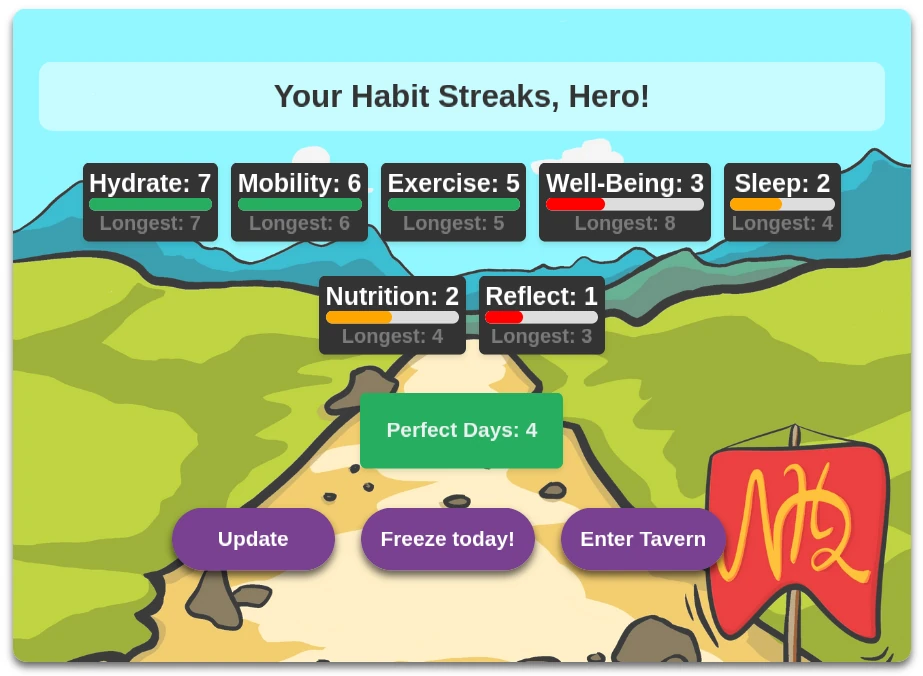
Check off your daily habits in Notion and watch your streaks grow in the widget. Join competitions and duels to stay motivated!
How it actually works
The three steps above are all you need to get started. Here is what runs in the background once you are connected, and why the integration is built this way.
Nightly safety-net sync at your local midnight
Your habits sync live every time you open the widget. As a safety net, each connected user's habits also sync once at midnight in their own configured timezone, so a day you never opened the widget still gets closed. A user in Tokyo and a user in Berlin each get their safety-net sync at their local midnight, not at a shared global time. Your streak count is always up to date by the time you wake up, wherever you live.
If a sync ever fails
If a sync fails overnight, a self-healing check catches and re-runs it in the early morning, so a technical hiccup on our side never breaks your streak.
Why streaks need an API integration
Notion formulas can reference properties on a single database page, but they cannot count consecutive days across multiple pages. The streak count in your widget is computed server-side by reading your Notion database via the official API. That is the only reason an integration is required; the goal was never to pull your data elsewhere. Read more on the about page.
What You Get
Streak Tracking
Build momentum with daily habit streaks. Don't break the chain!
Competitions & Duels
Challenge friends in group competitions or one-on-one duels. The widget shows both via tabs so you always know where you stand.
Freeze Days
Life happens. Use freeze days to protect your streaks when needed.
Progress Stats
Track your completion rates and see your improvement over time.
Your data stays in your Notion
Limited OAuth scope
The app reads one Notion database you choose. It cannot access the rest of your workspace.
Data in your workspace
Habit entries stay in your own Notion database. To compute streaks and points, Notion Habit Heroes also keeps a copy of your habit names and daily values on its own servers.
Disconnect anytime
Remove the Notion connection from your profile at any time. No lock-in.
Free to use
The habit tracker is completely free. EU-based operator. See our privacy policy and imprint.
Common questions
- Which Notion setups work?
- You need a Notion database where each row represents one day and has at least one checkbox property per habit you want to track. The free Notion habit tracker template is set up exactly this way, and connecting Notion from this site copies it into your workspace for you. If you already have a daily-pages database with checkbox properties, choose Select pages during the connect and pick it instead. With your own database you add the widget yourself: the setup page gives you your personal widget link to paste onto any Notion page.
- What happens if I miss checking habits one night?
- Missing one night does not cost you anything right away. You can still check off yesterday's habits any time today. It counts as soon as a sync runs that day: automatically when you open the Notion page with your widget, or on the spot with the Update button in the widget toolbar. Only from the day after is yesterday settled and no longer changeable. Freeze days protect a streak on a day you genuinely miss beyond that window.
- When do streaks update?
- Your streak count updates whenever a sync runs. A sync runs every time you open the Notion page with your widget, or on the spot when you click Update in the widget toolbar, so a check-off shows up in your streaks and points instantly. Independently, a nightly sync runs at midnight in your configured timezone to close the day even if you never opened the widget. A self-healing check also retries any sync that failed overnight, so by the time you start your day your streaks reflect the previous night.
- What happens if I disconnect Notion?
- Disconnecting takes back the permission you gave Notion Habit Heroes to read your habit database. You can do it at any time from your Profile page with Disconnect Notion. Syncing stops right away. Nothing in Notion is deleted, and your history, streaks, points and badges stay in your account. You stay in your competitions, but you don't earn new points while disconnected. To come back, connect again and choose the same database: your data is still there. Days in between are not filled in later, because a sync only reads today and yesterday. Reconnect by the next day and nothing is lost. If you stay disconnected longer, your current streak starts over; your longest streak and totals stay. Choosing a different database starts your history fresh. To remove your data instead, use Delete Account on your Profile page.
- Does it work with an existing habit database, or only the template?
- Both. During setup you can connect any existing Notion database that has daily pages with checkbox properties. See the template page for the exact schema the integration expects, so you can compare it against your own setup. For most users, letting the connect step copy the free template is the fastest starting point. With your own database you add the widget yourself: the setup page gives you your personal widget link to paste onto any Notion page.
Ready to Build Better Habits?
Built and run solo since February 2023. Every habit synced live when you open the widget, with a nightly safety net in your own timezone.